
Quick Links
- What Happened to macOS 16?
- macOS 26 Design
- macOS 26 Features
- A Turbo-Charged Spotlight
- Live Activities on Your Mac
- The Phone App Comes to Mac
- Long-Awaited Shortcuts Improvements
- Another Gaming Update
- Improvements to Messages
- Apple Intelligence Live Translation and Image Improvements
- macOS 26 Release Date
- macOS 26 Compatibility
What Happened to macOS 16?
With a focus on streamlining its software naming conventions, Apple has adopted a new strategy this year, moving from version numbers to a year-based format. As such, rather than launching macOS 16, the company is fast-tracking to macOS 26, a shift that extends to other platforms including iOS, watchOS, and tvOS.
Despite this change, Apple continues to utilize codenames for its operating systems. The latest update is codenamed Tahoe, echoing the company’s tradition of naming releases after Californian locations. During the WWDC 2025 event, Apple predominantly referred to this latest release as Tahoe.
macOS 26 Design
In conjunction with its new name, macOS 26 introduces a fresh design philosophy. Dubbed Liquid Glass, this visual style is defined by increased transparency, light refraction, and a sense of depth that contrasts with the prior flat design.
This aesthetic enhancement is evident throughout the operating system, including a redesigned dock that embodies the Liquid Glass theme and new icons that can be easily customized. However, the new style serves a greater purpose than mere aesthetics.
One notable innovation is the near invisibility of the menu bar, a modification that aims to create an illusion of more desktop space. Sidebars and toolbars are designed to float, adapting their size based on user scrolling, thereby showcasing more content beneath.
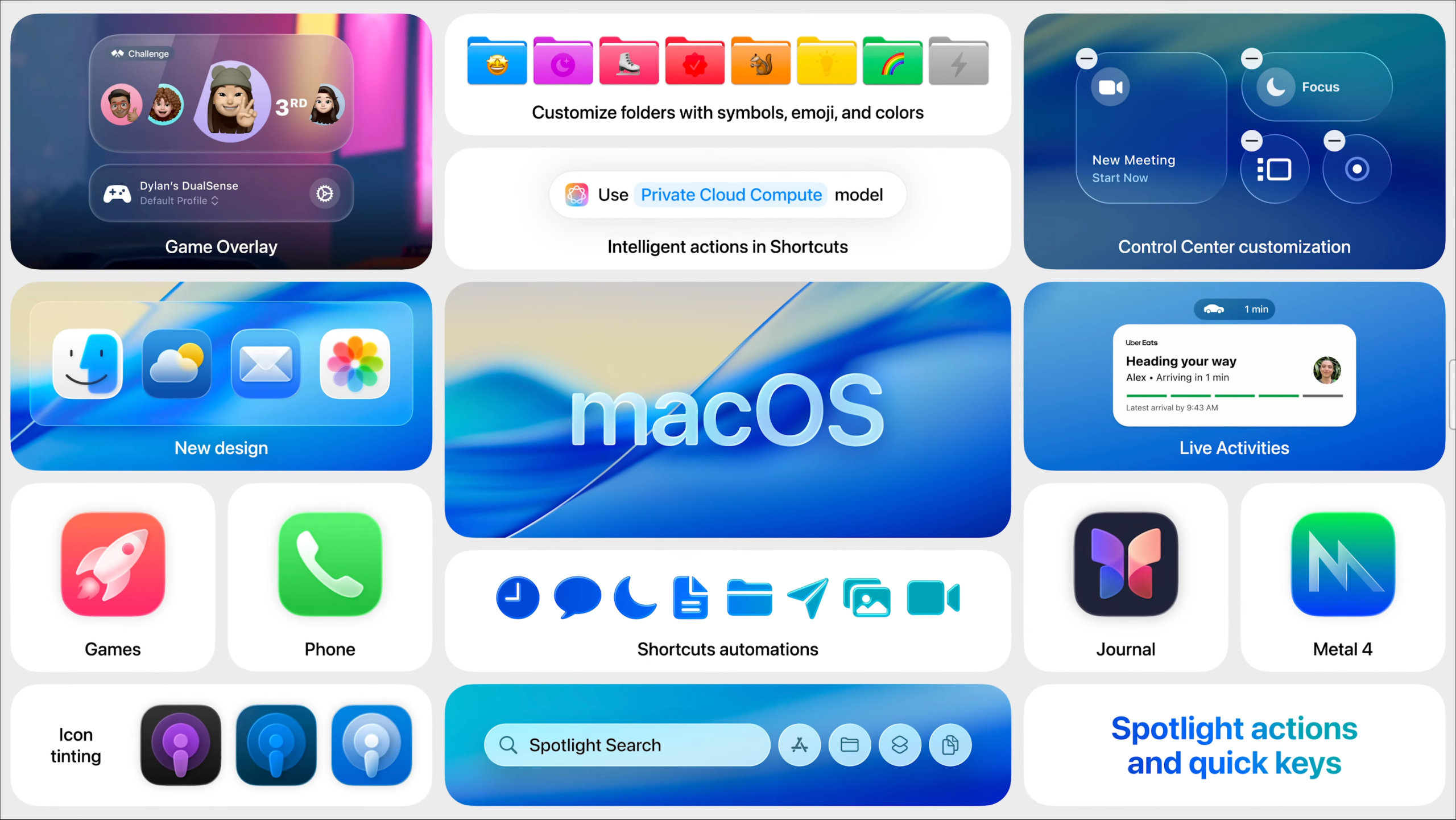
Further enhancing usability, the Control Center in the upper-right corner has become more customizable, now featuring transparent icons and the ability to integrate controls from third-party applications like Zoom.
macOS 26 Features
Alongside its new design and name, macOS 26 brings a variety of enhancements and features to improve user experience.
A Turbo-Charged Spotlight
Apple appears to have drawn inspiration from applications like Alfred and Raycast, introducing an upgraded Spotlight search that simplifies user actions. With macOS 26, users can initiate direct tasks from Spotlight—such as playing a podcast or rotating an image. For instance, one can begin composing an email right from Spotlight by defining the recipient, subject, and even including an attachment.
The new Quick keys streamline this process, allowing for rapid command entry, such as typing "sm" to send a message or "ar" to create a reminder. You can also assign personal key triggers for quick access to Shortcuts. This significant overhaul of Spotlight is likely to enhance daily workflows for many macOS users.
Spotlight also features app-awareness, enabling it to provide context-specific access within the apps being used. Triggering Spotlight while using a particular application allows for quick searches of tools or features relevant to that app. Additional functions include clipboard history, accessed by a button that appears when activating Spotlight via the default shortcut.
Live Activities on Your Mac
macOS 26 introduces Live Activities to the Mac desktop, extending the Continuity feature that bridges iOS and macOS. Now, these activities can be viewed in the menu bar as pop-ups—ideal for tracking food deliveries, ride-sharing updates, or sports scores. Engaging with a Live Activity leads to the app opening in an iPhone Mirrored window.
The Phone App Comes to Mac
With the release of Tahoe, users can now make phone calls through a dedicated Phone app—previously, functionalities were limited to FaceTime and accepting incoming calls via Handoff. This new app includes a comprehensive preview of incoming calls, enhancing usability.
The Phone app integrates all iOS 26 enhancements, such as Call Screening to verify call identities and Hold Assist, which mutes calls while on hold and notifies users when the call is ready to continue. Features like Live Voicemail, Call Recording, and SharePlay from the iOS version will also be available on the Mac.
Long-Awaited Shortcuts Improvements
macOS 26 finally supports Shortcuts triggers—akin to the Automations tab found in the iOS variant—allowing for automation based on specific events. Users can now set triggers based on time of day, messages from contacts, or even when particular files are modified. Additionally, capabilities for utilizing Apple Intelligence for tasks like text summaries and image generation are included, bringing added functionality.
Another Gaming Update
The gaming experience on macOS continues to evolve, with the introduction of Metal 4, Apple’s latest graphics API. New features include frame interpolation and denoising for ray tracing. The new Games app, identical to the forthcoming iOS 26 version, centralizes all games, providing ease in discovering new titles and managing friend interactions.
A novel game overlay function can be accessed via a controller button, enabling users to view system settings while playing. Several anticipated games, including Crimson Desert and titles from the Sims franchise, were highlighted by Apple.
Improvements to Messages
This year’s macOS update also brings enhancements to the Messages app, mirroring those seen in iOS 26. Notably, Message Screening will filter messages from unknown senders, allowing users to mark these contacts as known from a separate menu. Time-sensitive notifications for two-factor authentication codes will still be visible, while other potentially spam messages will be concealed.
Users will also gain the ability to personalize chat backgrounds, create polls in group conversations, and see typing indicators for all members in a group chat.
Apple Intelligence Live Translation and Image Improvements
macOS 26 integrates several features from iOS 26, such as Live Translate, which overlays translations during video calls on FaceTime. It also enables the Phone app to convey messages aloud and translate messages for users in their native language.
Operating offline with Apple Intelligence enabled (requiring M1 or newer), the Mac can harness these features seamlessly. Additionally, upgrades to Apple’s Image Playground app will include support for ChatGPT.
macOS 26 Release Date
While Apple has not confirmed a specific release date for Tahoe, it is expected in the fall, mirroring previous macOS launches. The latest iterations have typically released in October or September, suggesting the next rollout may occur mid-September. A public beta should be available soon, having followed similar timelines in previous years.
macOS 26 Compatibility
macOS 26 will be compatible with Apple silicon Macs featuring the M1 chip and later models, alongside select Intel models from 2019 and 2020. The full compatibility list includes various MacBook Air and Pro models, iMacs, Mac Mini, Mac Studio, and Mac Pro configurations.
It’s important to note that not all features may be accessible at launch, as Apple frequently refines or delays specific functionalities prior to the official release.




