
Apple Announces Major Update with iPadOS 26: Enhancing Productivity for Tablet Users
Introduction to iPadOS 26
At the Worldwide Developers Conference (WWDC) 2025, Apple unveiled iPadOS 26, marking what the company describes as its most significant software upgrade for the iPad to date. This update introduces a myriad of features aimed at improving productivity and providing a more desktop-like experience for users.
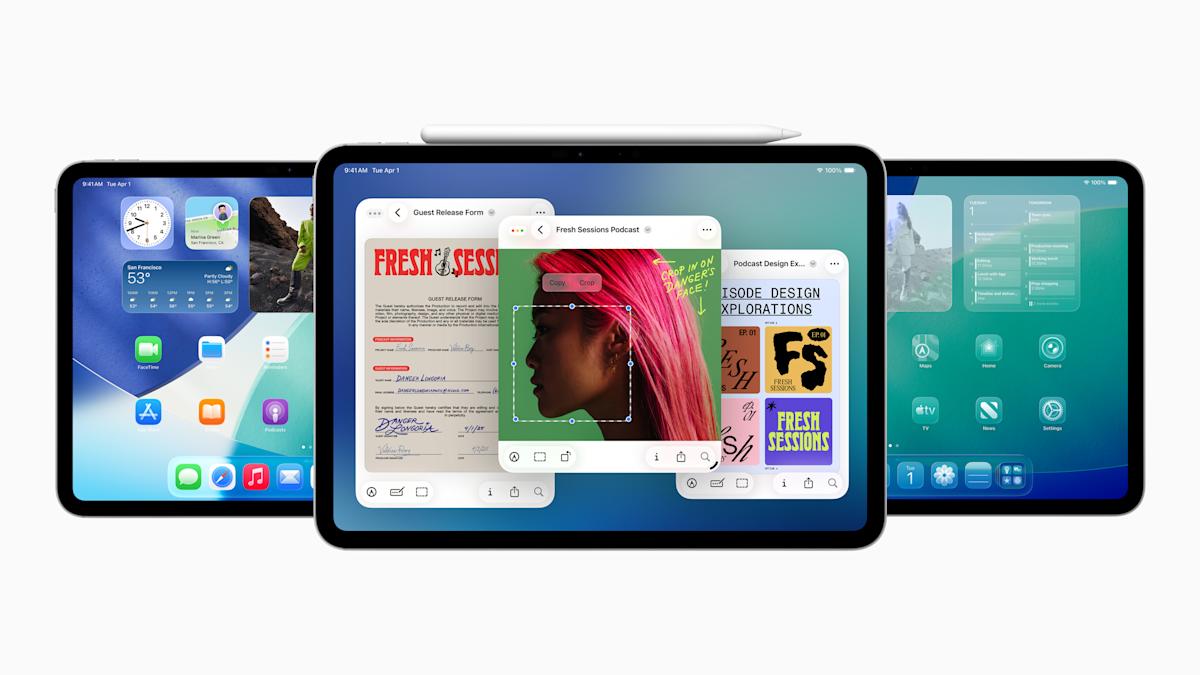
Dynamic Window Resizing and Enhanced Multitasking
One of the standout features in iPadOS 26 is the new dynamic window resizing capability. Users can now easily adjust app windows by dragging the lower-right corner, allowing for an adaptable workspace. This multitasking enhancement includes options to minimize, close, or tile windows, providing greater flexibility compared to previous versions of the Stage Manager.
The newly introduced AppleExposé feature enables users to view open applications in a well-organized, tiled format, facilitating swift navigation between tasks. Long-running processes will continue to operate in the background, visible as live activities, thus ensuring efficient workflow management.
Streamlined Menu Bar for Easier Navigation
In a nod to its Mac heritage, the iPad now incorporates a menu bar that provides familiar menu options such as File, Edit, and View. This feature can be accessed seamlessly through touch controls or with a mouse and trackpad, greatly enhancing navigation efficiency.
Introduction of the Preview App
iPadOS 26 also debuts the Preview app, allowing users to view and edit PDF documents effortlessly. The integration of the Apple Pencil or touch functionality enables easy markup, while the AutoFill feature simplifies form completion within PDFs, removing the need for third-party applications.
Enhancements to the Files App
The Files app receives a significant update, including an improved List view that displays additional document details. Features such as resizable columns and collapsible folders elevate file organization, and users can now set default applications for specific file types, making it easier to handle various file formats directly on their iPad.
A Comprehensive Productivity Upgrade
Apple has acknowledged the demand for stronger productivity tools for its iPad range. The updates in iPadOS 26 extend beyond the Pro and Air models, reaching even entry-level devices and the iPad mini. This broad inclusion demonstrates Apple’s commitment to catering to a diverse audience.
Liquid Glass Redesign and Unified Software Naming
The aesthetic appeal of iPadOS 26 is enhanced by the Liquid Glass redesign, which features translucent effects and rounded icons to align with Apple’s design philosophy. Moreover, the company is unifying its software versioning scheme, transitioning to a streamlined "26" designation for all upcoming releases, thus alleviating potential confusion among users.
Minor Updates and Features
In addition to the major changes, iPadOS 26 introduces several smaller yet impactful updates, including a dedicated Games app and the integration of a Phone app that allows users to make and receive calls directly from their tablets. Users will also benefit from an audio input selector for microphone choice per application, alongside advanced Apple Intelligence features like live translation.
Beta Availability and Release Timeline
Developers can now access the first beta version of iPadOS 26, with public beta testing set to begin in July. The final version of iPadOS 26 is expected to launch in the fall, around September, bringing a suite of new features and enhancements to Apple tablet users.
For more details and updates on iPadOS 26, stay tuned to Apple’s announcements as the fall release approaches.




